

This also applies to cable, chain, and webbing.
Gear that is anchored includes anchors, rocks, trees, tripods, trucks, etc.
A "bight" is a simple loop in a rope that does not cross itself.
A "bend" is a knot that joins two ropes together. Bends can only be attached to the end of a rope.
A "hitch" is a type of knot that must be tied around another object.
"Descending devices" (e.g., ATCs, Brake Bar Racks, Figure 8s, Rescue 8s, etc) create friction as their primary purpose. The friction in descending devices is always considered when calculating forces.
The "Safety Factor" is the ratio between the gear's breaking strength and the maximum load applied to the gear (e.g., 5:1).
This page contains tips to help you customize the routing of ropes in vRigger.
See solutions when ropes appear to penetrate other ropes.
Sometimes a rope will enter a piece of gear "backward" or the strands of rope will cross. This is more common with friction devices, like the Petzl I'D. You can often solve this by moving the items that are adjacent to the gear (e.g., moving the tail of the rope up/down or left/right) or you can reverse the routing of the rope.
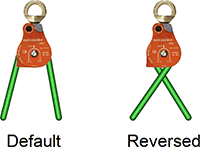
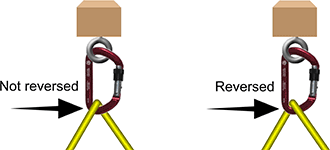
If the rope connects to the gear at one location, like this carabiner, the Reverse Rope Routing command reverses the threading of the rope through the gear.
In addition to reversing the routing of ropes that enter/exit a device, you can influence the entry/exit locations using control points.
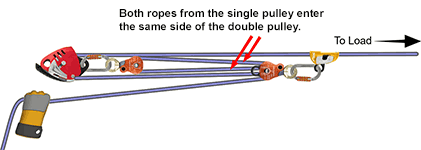
In the following illustration, the rope segments from the single pulley (on the left) both enter the same side of the double pulley. That's okay, but it might not be what you want.
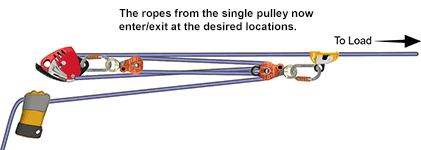
In this next illustration, a control point was added to one of the rope segments. It was then dragged near the side of the pulley where we wanted the rope to enter/exit the double pulley.
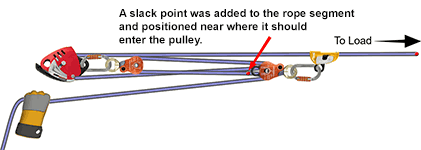
The resulting system shows the desired rope routing.
You can move a segment of rope behind, or in front of, other gear using the Draw in Front of All Gear or Draw Behind All Gear arrange rope segments commands.
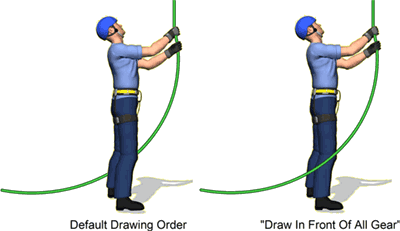
You can specify the drawing order of individual polyline and rope segments.
You can use "control points" to route the rope to any location on the workspace. Control points are extremely powerful and often overlooked. Learn about control points.
