

This also applies to cable, chain, and webbing.
Gear that is anchored includes anchors, rocks, trees, tripods, trucks, etc.
A "bight" is a simple loop in a rope that does not cross itself.
A "bend" is a knot that joins two ropes together. Bends can only be attached to the end of a rope.
A "hitch" is a type of knot that must be tied around another object.
"Descending devices" (e.g., ATCs, Brake Bar Racks, Figure 8s, Rescue 8s, etc) create friction as their primary purpose. The friction in descending devices is always considered when calculating forces.
The "Safety Factor" is the ratio between the gear's breaking strength and the maximum load applied to the gear (e.g., 5:1).
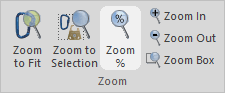
You can zoom in to get a close-up view of your rigging system or zoom out to see more of the system.
The zoom commands change the view of the entire workspace. Avoid the temptation to resize the individual pieces of gear—those commands should only be used to change the relative size of a few pieces of gear.
What do you want to do?
Do one of the following to automatically set the zoom level so all of the gear is visible.
Do one of the following:
Do one of the following:
Do one of the following:
Do one of the following:

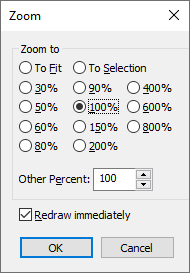
The Zoom dialog provides full control of the zooming.
Watch a video that explains how to zoom and scroll the workspace.
When you press the Ctrl key and roll the wheel on your mouse, vRigger zooms in/out on your mouse's location. (Customize the mouse commands.)
The zooming commands change the view of the entire workspace. Avoid the temptation to resize the individual pieces of gear. The individual sizing commands should only be used to change the relative size of a few pieces of gear.