

This also applies to cable, chain, and webbing.
Gear that is anchored includes anchors, rocks, trees, tripods, trucks, etc.
A "bight" is a simple loop in a rope that does not cross itself.
A "bend" is a knot that joins two ropes together. Bends can only be attached to the end of a rope.
A "hitch" is a type of knot that must be tied around another object.
"Descending devices" (e.g., ATCs, Brake Bar Racks, Figure 8s, Rescue 8s, etc) create friction as their primary purpose. The friction in descending devices is always considered when calculating forces.
The "Safety Factor" is the ratio between the gear's breaking strength and the maximum load applied to the gear (e.g., 5:1).
Many anchors in vRigger support a Wrap-3-Pull-2 command. When the Wrap-3-Pull-2 command is selected, a segment of rope is drawn across the anchor.
First connect a rope to the item.
Then do one of the following:
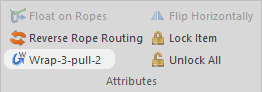
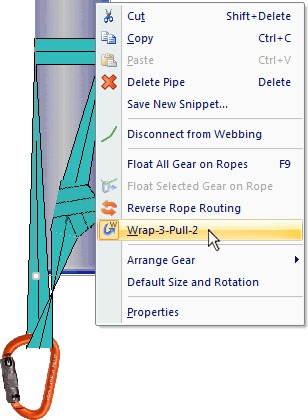
If the Wrap-3-Pull-2 command is disabled on the toolbar and isn't in the shortcut menu, it means the selected item doesn't support the Wrap-3-Pull-2 command. If there is gear in vRigger that you think should support the Wrap-3-Pull-2 command, please let us know!
When building an anchor using the wrap-3-pull-2 technique, many riggers position the knot on the anchor so the knot won't weaken the webbing. It takes a little trickery to display the knot on the wrapped object in vRigger (a sample file explains these steps):
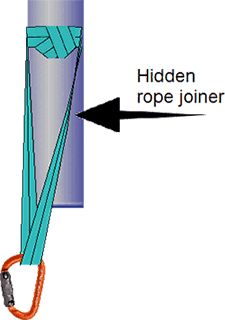
After using the Wrap-3-Pull-2 command, you may want to float the knot on the rope.
The Wrap-3-Pull-2 command is only available when chain, rope, or webbing is connected to an anchor that supports the Wrap-3-Pull-2 command. For example, a carabiner does not support the command, but trees, poles, and similar anchors do.
If you create your own gear using the Gear Builder, select the Can Wrap-3-Pull-2 checkbox if you want your gear to support the Wrap-3-Pull-2 command.